Thread Scheduler
When multiple threads are RUNNABLE at the same time, only a limited number can actually execute on the CPU. The thread scheduler is the component that decides which thread gets to run, for how long, and in what order. Understanding the scheduler helps you write code that is both correct and predictable under concurrency.
What Is the Thread Scheduler?
The thread scheduler is part of the JVM and, more specifically, part of the operating system. The JVM does not implement its own scheduler from scratch — it delegates to the native OS scheduler (Linux CFS, Windows thread dispatcher, macOS GCD, etc.). This means:
- Scheduling behavior is platform-dependent.
- Java does not guarantee a specific execution order between threads.
- You should never rely on threads running in a particular sequence unless you use explicit synchronization.
Note: The JVM exposes a thin API (priorities,
yield(),sleep()) to hint at the scheduler, but the OS has the final say.
Two Classic Scheduling Strategies
Most modern OSes use a hybrid approach, but two strategies are worth knowing:
| Strategy | How It Works | Implication |
|---|---|---|
| Preemptive | Scheduler forcibly switches threads after a time slice or when a higher-priority thread becomes runnable | Default on all modern OSes; threads can be interrupted mid-execution |
| Time Slicing (Round-Robin) | Each thread gets a fixed quantum of CPU time; scheduler rotates through runnable threads | Prevents any single thread from monopolizing the CPU |
| Cooperative (non-preemptive) | A thread runs until it voluntarily yields | Rare today; one misbehaving thread can freeze the whole program |
Modern JVMs run on preemptive, time-sliced OSes, so you benefit from both fairness and responsiveness automatically.
Thread Priority
Every Java thread has a priority — an integer from 1 (lowest) to 10 (highest). The JVM passes this hint to the OS scheduler, which may prefer higher-priority threads.
Three constants in Thread map to common values:
| Constant | Value |
|---|---|
Thread.MIN_PRIORITY | 1 |
Thread.NORM_PRIORITY | 5 (default) |
Thread.MAX_PRIORITY | 10 |
public class PriorityDemo {
    public static void main(String[] args) {
        Thread low = new Thread(() -> {
            for (int i = 0; i < 3; i++)
                System.out.println("LOW  thread: " + i);
        });
        Thread high = new Thread(() -> {
            for (int i = 0; i < 3; i++)
                System.out.println("HIGH thread: " + i);
        });

        low.setPriority(Thread.MIN_PRIORITY);   // 1
        high.setPriority(Thread.MAX_PRIORITY);  // 10

        low.start();
        high.start();
    }
}
Output (may vary):
HIGH thread: 0
HIGH thread: 1
HIGH thread: 2
LOW  thread: 0
LOW  thread: 1
LOW  thread: 2
Warning: Priority behavior is not guaranteed. On Linux, Java thread priorities often map to the same OS-level nice value, so you may see no difference at all. Never use priorities as a correctness mechanism — they are performance hints only.
Thread.yield()
Thread.yield() is a hint to the scheduler saying: “I’m willing to pause and let another thread of equal or higher priority run.” The scheduler is free to ignore this hint entirely.
public class YieldDemo {
    public static void main(String[] args) {
        Runnable task = () -> {
            for (int i = 0; i < 5; i++) {
                System.out.println(Thread.currentThread().getName() + " — " + i);
                Thread.yield(); // politely step aside
            }
        };

        Thread t1 = new Thread(task, "Alpha");
        Thread t2 = new Thread(task, "Beta");
        t1.start();
        t2.start();
    }
}
Output (one possible run):
Alpha — 0
Beta  — 0
Alpha — 1
Beta  — 1
...
yield() is rarely necessary in production code. It is most useful in tight spin-loops where you want to be a “good neighbor” to other threads.
Thread.sleep()
Thread.sleep(millis) moves the current thread from RUNNABLE to TIMED_WAITING, giving the scheduler a chance to run other threads. See Thread.sleep() for the full deep-dive, but here is a quick reminder:
public class SleepDemo {
    public static void main(String[] args) throws InterruptedException {
        System.out.println("Before sleep: " + Thread.currentThread().getState()); // RUNNABLE
        Thread.sleep(1000); // sleep for 1 second
        System.out.println("After sleep — back to RUNNABLE");
    }
}
Tip:
Thread.sleep()does not release any monitor locks the thread holds. If you need to release a lock while waiting, useObject.wait()inside asynchronizedblock instead.
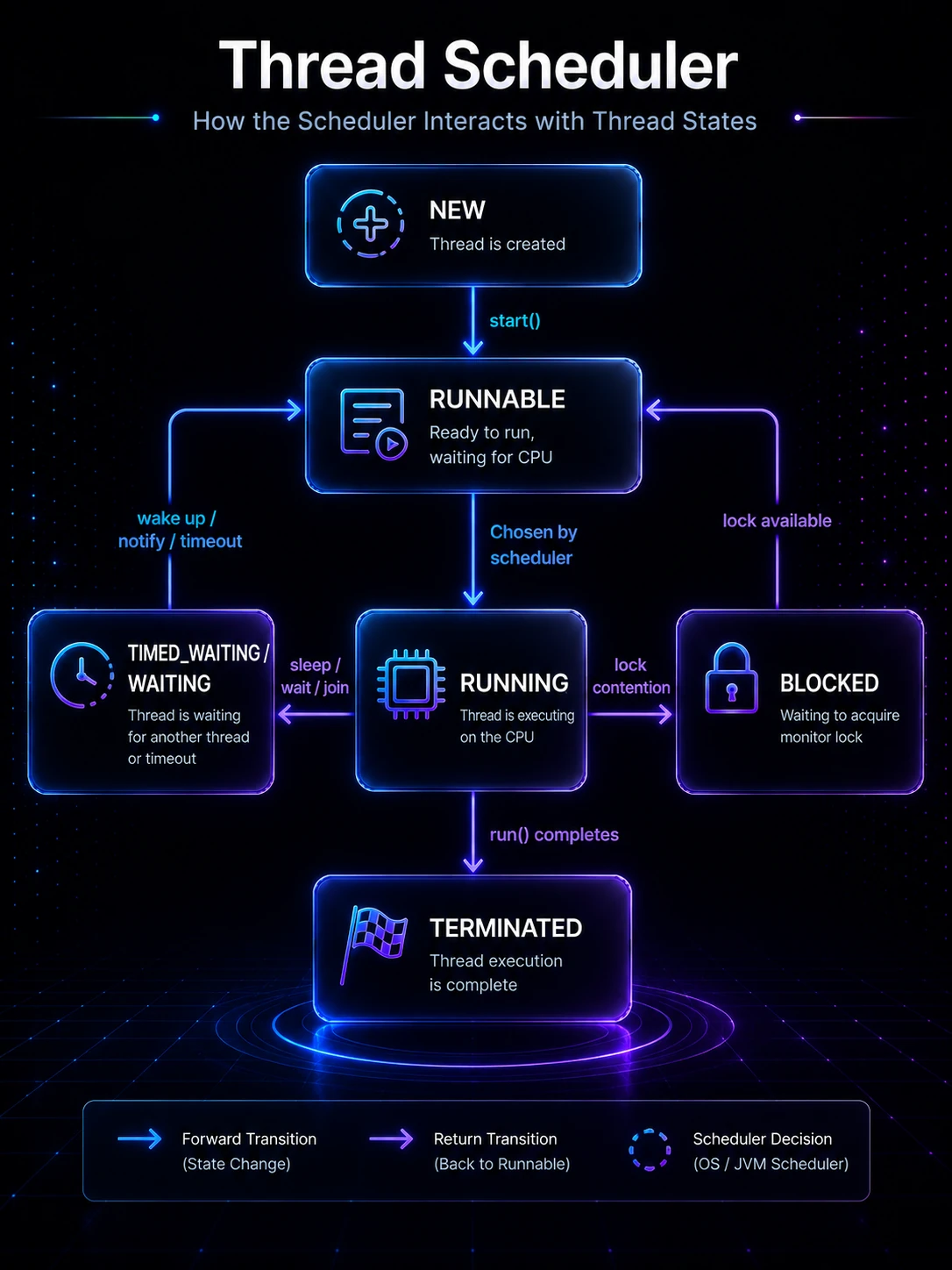
How the Scheduler Interacts with Thread States
The scheduler only picks from threads in the RUNNABLE state. All other states are scheduler-invisible:
   NEW ──► RUNNABLE ◄──────────────────────┐
               │                           │
     Scheduler picks it                    │
               │                           │
               ▼                           │
           RUNNING ──► sleep/wait/join ──► TIMED_WAITING / WAITING
               │                           │
               │       lock contention      │
               └──────────────────────────►BLOCKED
               │
               ▼
           TERMINATED
When a thread’s sleep expires, it moves back to RUNNABLE — it does not jump straight onto the CPU. It re-enters the scheduling queue and waits its turn.
Under the Hood
OS Scheduler Integration
The JVM maps each Java thread to a native OS thread (one-to-one model, also called the kernel-level thread model). This means:
- The OS kernel scheduler has full visibility and control over Java threads.
- On Linux, Java threads are
pthreads scheduled by the Completely Fair Scheduler (CFS). - On Windows, they map to Windows kernel threads and are scheduled by the Windows NT dispatcher.
Because threads are OS-native, a blocking system call in one thread (e.g., a file read) does not block other Java threads — the OS parks the blocking thread and runs another.
Note: Virtual Threads, introduced in Java 21, break this one-to-one model. Many virtual threads share a small pool of OS carrier threads, allowing millions of concurrent threads without exhausting OS resources.
Priority Mapping
Java’s 1–10 priority range maps to OS-specific values:
| OS | Mapping |
|---|---|
| Windows | Maps roughly to 7 distinct priority levels |
| Linux | All Java threads typically get the same nice value (0) unless you use setpriority() at the OS level |
| macOS | Maps to QoS classes |
This inconsistency is why priority is unreliable as a concurrency tool.
Time Slices and Context Switching
A context switch occurs when the scheduler preempts one thread and resumes another. Each switch involves:
- Saving the current thread’s CPU registers, program counter, and stack pointer.
- Loading the next thread’s saved state.
- Flushing / reloading CPU caches (TLB, L1/L2 may be cold for the new thread).
Context switches are cheap (microseconds) but not free. Creating thousands of OS threads can degrade performance due to excessive context switching — which is exactly the problem Virtual Threads and Thread Pools solve.
Practical Takeaways
Keep these rules in mind when writing multithreaded code:
- Never assume thread execution order. Two threads may interleave in any way the scheduler sees fit.
- Do not rely on priorities for correctness. Use synchronization, locks, or higher-level concurrency utilities instead.
- Prefer
sleep()and blocking APIs over busy-waiting. Spinning wastes CPU and may starve other threads. - Use thread pools (
ExecutorService) rather than raw threads for most production code — the framework handles scheduling concerns for you. See Thread Pools & Executors. - Profile before optimizing. Scheduling problems are often revealed by tools like
jstack, VisualVM, or async-profiler rather than guesswork.
Related Topics
- Thread Life Cycle — understand the states the scheduler moves threads through
- Thread.sleep() — move a thread out of the scheduling queue temporarily
- Thread Priority — set priority hints and understand their real-world effect
- Thread Pools & Executors — let the framework manage scheduling so you don’t have to
- Virtual Threads (Project Loom) — Java 21’s lightweight threads that sidestep OS scheduler limits
- Synchronization — the correct tool for coordinating threads, unlike priority hints