FileReader
FileReader is Java’s simplest way to read text from a file. It treats file contents as a stream of characters rather than raw bytes, making it a natural fit whenever you need to read plain-text data like .txt, .csv, or .log files.
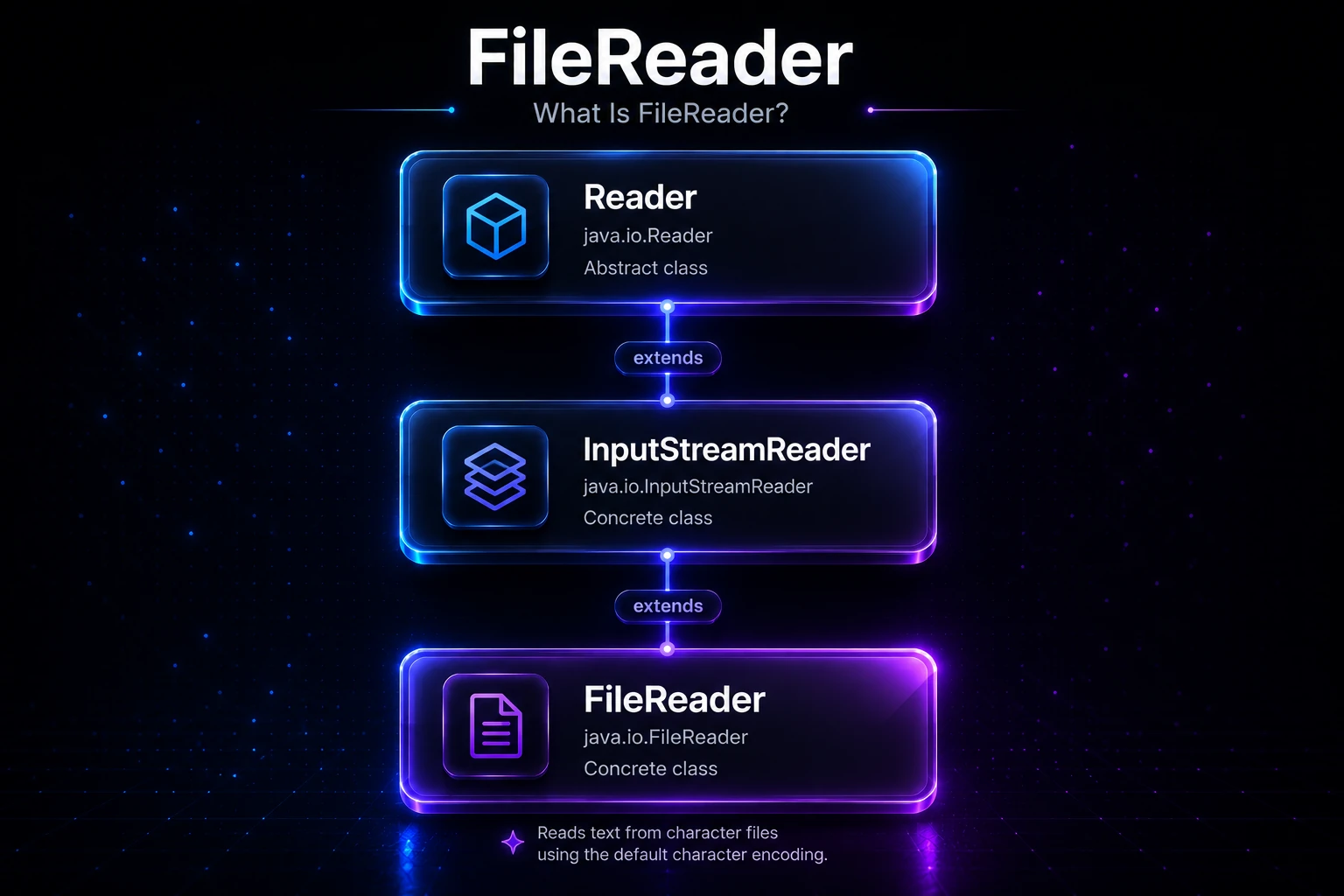
What Is FileReader?
FileReader lives in the java.io package and extends InputStreamReader, which itself extends Reader. This places it firmly in Java’s character stream hierarchy — as opposed to byte streams like FileInputStream.
Reader
  └── InputStreamReader
        └── FileReader
Under the hood, FileReader wraps a FileInputStream and decodes bytes into characters using the platform’s default charset (typically UTF-8 on modern systems). For most everyday text reading tasks this works fine, but when you need explicit encoding control, use InputStreamReader with a named charset instead.
Note:
FileReaderreads characters, not bytes. If you need to read binary data (images, audio, etc.), use FileInputStream.
Creating a FileReader
You can create a FileReader from either a file path string or a File object.
import java.io.FileReader;
import java.io.File;
import java.io.IOException;

public class CreateExample {
    public static void main(String[] args) throws IOException {
        // From a path string
        FileReader fr1 = new FileReader("notes.txt");

        // From a File object
        File file = new File("notes.txt");
        FileReader fr2 = new FileReader(file);

        // Always close when done
        fr1.close();
        fr2.close();
    }
}
Warning: If the file does not exist,
FileReaderthrows aFileNotFoundException(a subclass ofIOException). Always handle or declare this exception.
Reading Characters: The Three read() Methods
FileReader inherits three reading methods from Reader:
| Method | Returns | Description |
|---|---|---|
read() | int (0–65535 or -1) | Reads a single character |
read(char[] cbuf) | int | Fills the entire char array; returns count or -1 |
read(char[] cbuf, int off, int len) | int | Reads up to len chars into cbuf starting at off |
A return value of -1 always signals the end of the stream.
Reading One Character at a Time
import java.io.FileReader;
import java.io.IOException;

public class ReadOneChar {
    public static void main(String[] args) throws IOException {
        try (FileReader fr = new FileReader("notes.txt")) {
            int ch;
            while ((ch = fr.read()) != -1) {
                System.out.print((char) ch);
            }
        }
    }
}
Output (if notes.txt contains Hello, Java!):
Hello, Java!Tip: The
try-with-resourcesblock (Java 7+) automatically closes theFileReadereven if an exception occurs — always prefer it over a manualclose()call.
Reading into a Char Array (Bulk Read)
Reading one character at a time is simple but slow — each call may hit the disk. Reading a chunk at a time is much more efficient:
import java.io.FileReader;
import java.io.IOException;

public class ReadChunk {
    public static void main(String[] args) throws IOException {
        try (FileReader fr = new FileReader("notes.txt")) {
            char[] buffer = new char[512];
            int charsRead;
            while ((charsRead = fr.read(buffer)) != -1) {
                System.out.print(new String(buffer, 0, charsRead));
            }
        }
    }
}
Note: Always use
new String(buffer, 0, charsRead)rather thannew String(buffer)— the array may be larger than the actual data read on the last iteration.
Checking Readiness with ready()
The ready() method returns true if the stream is ready to be read without blocking. This is rarely critical for file I/O (files don’t block like sockets do), but it can be useful in non-blocking patterns:
import java.io.FileReader;
import java.io.IOException;

public class ReadyExample {
    public static void main(String[] args) throws IOException {
        try (FileReader fr = new FileReader("notes.txt")) {
            if (fr.ready()) {
                System.out.println("Stream is ready — starting read.");
                int ch;
                while ((ch = fr.read()) != -1) {
                    System.out.print((char) ch);
                }
            }
        }
    }
}
A Complete, Practical Example
Here is a realistic snippet that reads a small text file and prints each line by tracking newline characters:
import java.io.FileReader;
import java.io.IOException;

public class ReadLines {
    public static void main(String[] args) throws IOException {
        StringBuilder sb = new StringBuilder();
        try (FileReader fr = new FileReader("notes.txt")) {
            int ch;
            while ((ch = fr.read()) != -1) {
                if ((char) ch == '\n') {
                    System.out.println(sb);
                    sb.setLength(0);   // reset the builder
                } else {
                    sb.append((char) ch);
                }
            }
            // Print any remaining content after the last newline
            if (sb.length() > 0) {
                System.out.println(sb);
            }
        }
    }
}
Tip: For real line-by-line reading, wrap
FileReaderin a BufferedReader and callreadLine(). It handles\r\n,\n, and\rendings automatically and is far more efficient.
Wrapping FileReader with BufferedReader
On its own, FileReader reads one character per call and typically results in one system call per character. Wrapping it in a BufferedReader adds an internal buffer (default 8 KB) so that many characters are fetched in a single I/O operation:
import java.io.BufferedReader;
import java.io.FileReader;
import java.io.IOException;

public class BufferedExample {
    public static void main(String[] args) throws IOException {
        try (BufferedReader br = new BufferedReader(new FileReader("notes.txt"))) {
            String line;
            while ((line = br.readLine()) != null) {
                System.out.println(line);
            }
        }
    }
}
This is the most common pattern you will see in production code, and it is significantly faster than calling fr.read() in a loop for anything beyond tiny files.
Specifying a Charset (Java 11+)
Before Java 11, FileReader always used the platform default charset and there was no way to change it. Java 11 added two new constructors that accept a Charset:
import java.io.FileReader;
import java.io.IOException;
import java.nio.charset.StandardCharsets;

public class EncodingExample {
    public static void main(String[] args) throws IOException {
        // Explicitly read as UTF-8, regardless of platform default
        try (FileReader fr = new FileReader("notes.txt", StandardCharsets.UTF_8)) {
            int ch;
            while ((ch = fr.read()) != -1) {
                System.out.print((char) ch);
            }
        }
    }
}
Tip: If your application might run on Windows (where the default charset can still be
windows-1252in some configurations), always specifyStandardCharsets.UTF_8explicitly to prevent garbled text.
FileReader vs Other Text-Reading Classes
| Class | Buffered? | Encoding Control | Reads Lines? | Best For |
|---|---|---|---|---|
FileReader | No | Java 11+ only | No | Simple character-by-character reads |
BufferedReader | Yes (wraps Reader) | Inherited from wrapped Reader | Yes (readLine()) | Efficient line-by-line file reading |
InputStreamReader | No | Yes (any charset) | No | Reading bytes with custom encoding |
Scanner | Yes | Yes | Yes (nextLine()) | Parsing tokens from text |
Under the Hood
When you construct a FileReader, the JVM creates a StreamDecoder that sits between the raw byte source and your character stream. Here is what happens on each read() call:
- The
StreamDecoderrequests bytes from the underlyingFileInputStream(one or more, depending on the charset — UTF-8 uses 1–4 bytes per character). - It decodes the byte sequence into a Unicode code point (a
charvalue). - That
intvalue is returned to your code.
Because each call potentially hits the OS to read bytes (if no buffering is in place), unbuffered FileReader on a spinning disk can be 10–100× slower than the same code wrapped in a BufferedReader. The OS and JVM do have their own page caches and read-ahead mechanisms, but explicitly buffering is still the right practice.
Internally, FileReader delegates to InputStreamReader, which means it inherits the getEncoding() method — useful for debugging charset issues:
try (FileReader fr = new FileReader("notes.txt")) {
    System.out.println("Encoding: " + fr.getEncoding());
}
Output (on a typical Linux/macOS system):
Encoding: UTF8Note:
getEncoding()returns the historical IANA name (e.g.,UTF8), not the canonical Java name (UTF-8). They refer to the same charset.
Related Topics
- BufferedReader — wrap
FileReaderwithBufferedReaderfor fast line-by-line reading - FileWriter — the character-based counterpart for writing text to files
- InputStreamReader — full charset control when reading bytes as characters
- Byte vs Character Streams — understand when to use
FileReadervsFileInputStream - FileInputStream — byte-level file reading for binary data
- Scanner — a higher-level alternative for parsing text files token by token