RowSet
RowSet is a powerful extension of ResultSet that wraps JDBC operations inside a JavaBeans-style component. It can work disconnected from the database, be serialized and sent over a network, and even fire events when data changes — all things a plain ResultSet cannot do.
Why RowSet Exists
A standard ResultSet is tied to an open database connection for its entire lifetime. That works fine for short server-side queries, but it breaks down when you need to:
- Pass query results to a UI layer without keeping a connection open.
- Serialize results and send them over the wire (e.g., in a web service).
- Filter, sort, or paginate data in memory without hitting the database again.
- Bind table data directly to a Swing component via the observer pattern.
RowSet was designed to fill all these gaps. It lives in javax.sql (the optional JDBC extension package, included in the standard JDK since Java SE 1.4).
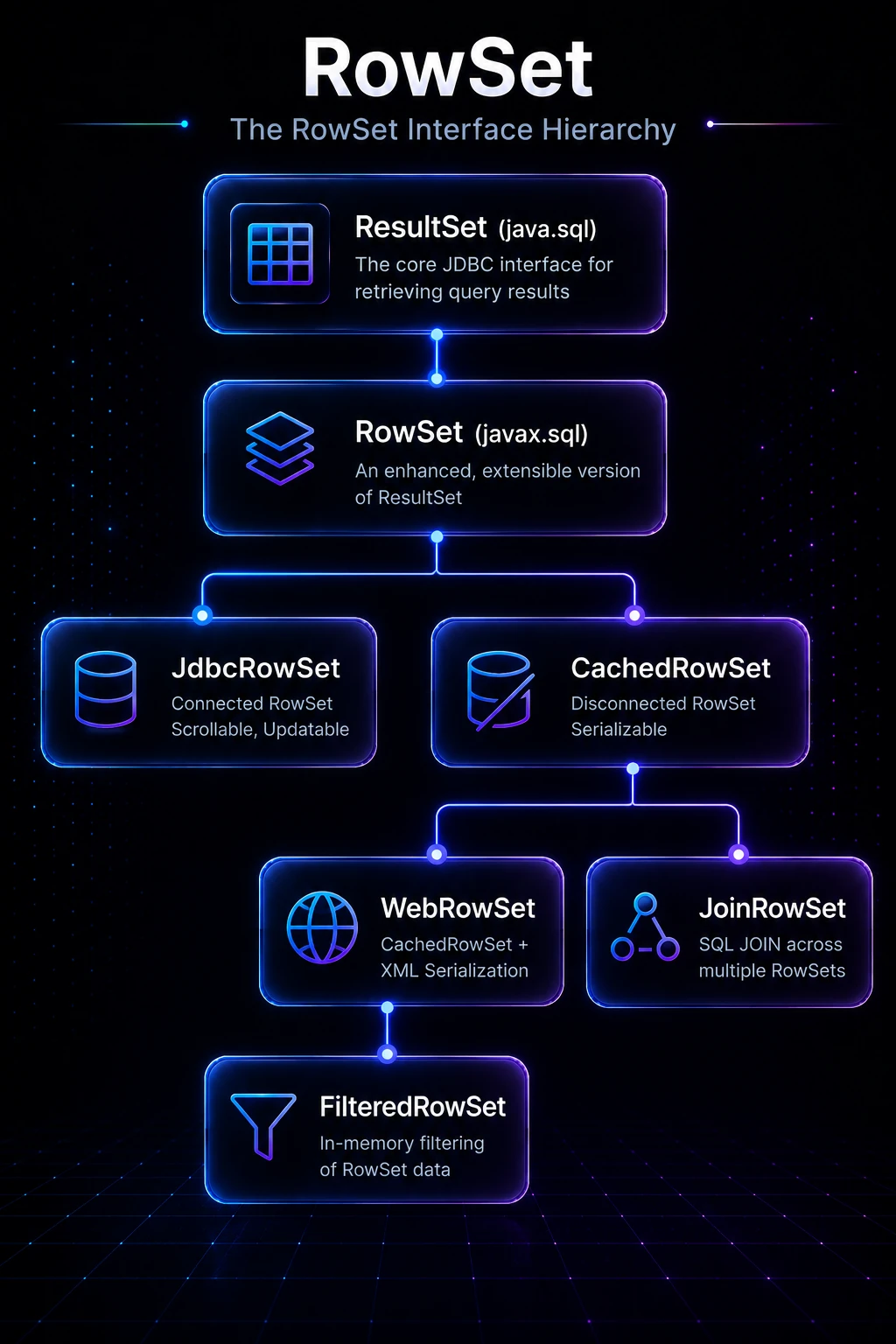
The RowSet Interface Hierarchy
RowSet extends ResultSet, so every method you already know — next(), getString(), getInt(), etc. — still works. On top of that, RowSet adds the JavaBeans contract: properties, a no-arg constructor, and event support.
ResultSet  (java.sql)
   └── RowSet  (javax.sql)
         ├── JdbcRowSet         — connected, scrollable, updatable
         ├── CachedRowSet       — disconnected, serializable
         │      ├── WebRowSet   — CachedRowSet + XML serialization
         │      │      └── FilteredRowSet  — in-memory filtering
         │      └── JoinRowSet  — SQL JOIN across multiple RowSets
The five standard implementations all live in javax.sql.rowset and are part of the JDK (concrete classes are in com.sun.rowset or provided by your JDBC driver).
Creating a RowSet with RowSetProvider
Since Java 7, the recommended way to create a RowSet is through RowSetProvider and RowSetFactory — no need to reference vendor-specific classes:
import javax.sql.rowset.*;

RowSetFactory factory = RowSetProvider.newFactory();
CachedRowSet crs = factory.createCachedRowSet();
JdbcRowSet    jrs = factory.createJdbcRowSet();
Tip: Always use
RowSetProvider.newFactory()rather thannew com.sun.rowset.CachedRowSetImpl(). The factory picks the best available implementation and keeps your code portable.
JdbcRowSet — Connected and Scrollable
JdbcRowSet is the simplest upgrade from a plain ResultSet. It stays connected, but it is scrollable and updatable by default, and it supports events.
import javax.sql.rowset.*;
import java.sql.*;

public class JdbcRowSetDemo {
    public static void main(String[] args) throws Exception {
        RowSetFactory factory = RowSetProvider.newFactory();

        try (JdbcRowSet jrs = factory.createJdbcRowSet()) {
            jrs.setUrl("jdbc:mysql://localhost:3306/school");
            jrs.setUsername("root");
            jrs.setPassword("password");
            jrs.setCommand("SELECT id, name FROM students WHERE grade > ?");
            jrs.setDouble(1, 75.0);
            jrs.execute();          // opens connection, runs query

            while (jrs.next()) {
                System.out.println(jrs.getInt("id") + " — " + jrs.getString("name"));
            }
        } // connection closed automatically
    }
}
Output:
1 — Alice
3 — Carlos
5 — Priya
Notice that JdbcRowSet manages the connection internally. You just set URL, credentials, command, and parameters — then call execute().
CachedRowSet — Disconnected and Serializable
CachedRowSet is the star of the show. It fetches all rows into memory, closes the connection, and lets you work offline. When you are done editing, you can synchronize changes back to the database in one batch.
import javax.sql.rowset.*;
import java.sql.*;

public class CachedRowSetDemo {
    public static void main(String[] args) throws Exception {
        // --- Phase 1: connect, fetch, disconnect ---
        RowSetFactory factory = RowSetProvider.newFactory();
        CachedRowSet crs = factory.createCachedRowSet();

        crs.setUrl("jdbc:mysql://localhost:3306/school");
        crs.setUsername("root");
        crs.setPassword("password");
        crs.setCommand("SELECT id, name, grade FROM students");
        crs.execute();  // fetches all rows, then closes connection

        // --- Phase 2: work completely offline ---
        while (crs.next()) {
            double grade = crs.getDouble("grade");
            if (grade < 50.0) {
                crs.updateDouble("grade", 50.0); // in-memory update
                crs.updateRow();
            }
        }

        // --- Phase 3: sync changes back ---
        try (Connection conn = DriverManager.getConnection(
                "jdbc:mysql://localhost:3306/school", "root", "password")) {
            crs.acceptChanges(conn); // writes deltas to the database
        }

        crs.close();
    }
}
Note:
acceptChanges()uses an optimistic locking strategy. If another transaction modified the same row between your fetch and your sync, aSyncProviderExceptionis thrown. You can plug in a customSyncProviderto change the conflict-resolution policy.
Pagination with CachedRowSet
For large result sets you can page through data by setting a page size:
crs.setPageSize(50);       // fetch at most 50 rows per page
crs.execute();             // loads first 50 rows, disconnects

// process first page …

crs.nextPage();            // reconnects, fetches rows 51–100, disconnects
// process second page …
This is useful when you cannot load an entire table into memory.
WebRowSet — XML Serialization
WebRowSet extends CachedRowSet and adds the ability to read/write rows as a standardized XML document (defined by the W3C RowSet schema). This is handy for web services and cross-language data exchange.
import javax.sql.rowset.*;
import java.io.*;

WebRowSet wrs = factory.createWebRowSet();
wrs.setUrl("jdbc:mysql://localhost:3306/school");
wrs.setUsername("root");
wrs.setPassword("password");
wrs.setCommand("SELECT id, name FROM students");
wrs.execute();

// Write rows as XML
try (Writer out = new FileWriter("students.xml")) {
    wrs.writeXml(out);
}

// Read rows back from XML (no database needed)
WebRowSet wrs2 = factory.createWebRowSet();
try (Reader in = new FileReader("students.xml")) {
    wrs2.readXml(in);
}
wrs2.close();
wrs.close();
FilteredRowSet — In-Memory Filtering
FilteredRowSet lets you apply a Predicate filter to a CachedRowSet without writing another SQL query:
import javax.sql.rowset.*;
import javax.sql.rowset.predicate.Range;

FilteredRowSet frs = factory.createFilteredRowSet();
frs.setUrl("jdbc:mysql://localhost:3306/school");
frs.setUsername("root");
frs.setPassword("password");
frs.setCommand("SELECT id, name, grade FROM students");
frs.execute();

// Show only students with grade between 80 and 100
Range gradeFilter = new Range(80, 100, "grade");
frs.setFilter(gradeFilter);

while (frs.next()) {
    System.out.println(frs.getString("name") + ": " + frs.getDouble("grade"));
}
frs.close();
Tip:
Rangeis a built-inPredicateinjavax.sql.rowset.predicate. You can also implement thePredicateinterface yourself for custom logic.
RowSet Events
Every RowSet is a JavaBeans event source. You can listen for row changes, cursor movement, and row set changes:
jrs.addRowSetListener(new RowSetListener() {
    @Override
    public void cursorMoved(RowSetEvent event) {
        System.out.println("Cursor moved");
    }
    @Override
    public void rowChanged(RowSetEvent event) {
        System.out.println("Row changed");
    }
    @Override
    public void rowSetChanged(RowSetEvent event) {
        System.out.println("Entire RowSet reloaded");
    }
});
This makes RowSet a natural fit for data-binding in desktop UIs (e.g., Swing’s TableModel).
RowSet vs ResultSet — Quick Comparison
| Feature | ResultSet | RowSet |
|---|---|---|
| Requires open connection | Yes (always) | Only JdbcRowSet; others disconnect |
| Serializable | No | Yes (CachedRowSet and subclasses) |
| Scrollable by default | Depends on Statement type | Yes |
| Updatable by default | Depends on Statement type | Yes |
| JavaBeans events | No | Yes |
| XML serialization | No | Yes (WebRowSet) |
| In-memory filtering | No | Yes (FilteredRowSet) |
| SQL JOIN across sets | No | Yes (JoinRowSet) |
Under the Hood
When you call CachedRowSet.execute(), the implementation:
- Opens a
Connectionusing the stored URL/credentials (or aDataSource). - Creates a PreparedStatement, sets parameters, and calls
executeQuery(). - Iterates the
ResultSetand copies every row’s data into an internalObject[][]array (the “original” snapshot). - Closes the
ResultSet, Statement, andConnection. - Sets a separate “current” copy of the data for in-memory edits.
When you call updateRow() on a disconnected CachedRowSet, changes go into the “current” copy only. The “original” snapshot is untouched. acceptChanges() diffs the two copies to generate minimal INSERT/UPDATE/DELETE statements, reconnects, and executes them. If the database row was modified by someone else since you fetched it (optimistic lock conflict), a SyncProviderException is raised.
Because all rows live in heap memory, CachedRowSet is inappropriate for large result sets — prefer pagination (setPageSize) or server-side filtering in SQL. For connection pooling, pass a DataSource to setDataSource() instead of setting URL/username/password directly, so the pool manages connections efficiently.
Related Topics
- ResultSet — the foundation interface that RowSet extends
- PreparedStatement — parameterised SQL execution used internally by RowSet
- Statement — the basic JDBC statement for running SQL
- Transaction Management — controlling commits and rollbacks during
acceptChanges() - Batch Processing — another pattern for batching database writes efficiently
- JDBC — start here for the full JDBC picture