Why String is Immutable
In Java, a String object cannot be changed after it is created — every operation that appears to “modify” a string actually produces a brand-new String object. This design is deliberate, and understanding it will save you from subtle bugs and help you write faster, safer code.
What Immutability Means
When you write s = s + "!", you are not appending to the original string. Java creates a new String object and reassigns the variable s to point to it. The old object is left unchanged (and eventually garbage-collected if nothing else holds a reference to it).
public class ImmutabilityDemo {
    public static void main(String[] args) {
        String s = "Hello";
        String t = s;           // both variables point to the same object

        s = s + " World";       // s now points to a NEW object

        System.out.println(s);  // Hello World
        System.out.println(t);  // Hello  — unchanged!
    }
}
Output:
Hello World
Hello
t still holds the reference to the original "Hello" — no code can mutate that object through s.
Note: The variable
sis mutable (you can reassign it), but theStringobject it points to is immutable. These are two different things.
Five Reasons Java Made String Immutable
1. String Pool Efficiency
Java maintains a special region of the heap called the String Pool (part of the method area / metaspace). When you write a string literal, the JVM checks whether that value already exists in the pool. If it does, it returns the same object rather than creating a new one.
String a = "Java";
String b = "Java";

System.out.println(a == b);      // true — same object from the pool
System.out.println(a.equals(b)); // true
This sharing is only safe because strings cannot change. If a could mutate "Java" to "Python", b would silently see "Python" too — a nightmare scenario. Immutability makes the pool trustworthy.
2. Thread Safety
An immutable object can be freely shared across threads without synchronization. No thread can alter the object’s state, so there is no risk of one thread seeing a half-updated string written by another.
// Safe to share across many threads — no locks needed
public class Config {
    public static final String DB_URL = "jdbc:mysql://localhost/mydb";
}
If String were mutable, every access to DB_URL across concurrent threads would require explicit locking.
3. Security
Strings carry sensitive data — file paths, usernames, passwords, class names for reflection. If they were mutable, an attacker could obtain a reference to a validated string (say, a file path that passed a security check) and then mutate it after the check but before it is used.
// Hypothetical MUTABLE scenario — DO NOT DO THIS
// String path = "/safe/resource";
// securityCheck(path);         // passes
// path.mutate("/etc/passwd");  // changes the object in place!
// openFile(path);              // now opens /etc/passwd
Because strings are immutable, the value you checked is guaranteed to be the value used. This is why the JVM itself relies on immutable String for class loading — a class name cannot be swapped for a malicious one between load and verification.
4. Hashcode Caching
String caches its hashCode() result after the first computation. Because the content can never change, the cached value is always valid.
String key = "username";

// First call: computes and caches the hash
int h1 = key.hashCode();

// Subsequent calls: returns the cached value instantly
int h2 = key.hashCode();

System.out.println(h1 == h2); // true, and the second call is O(1)
This makes strings extremely efficient as HashMap keys — a very common use case. A mutable string would require recomputation on every call (or risk returning stale hashes after mutation).
5. Class Loading Integrity
The JVM uses String to identify classes, packages, and resources. Immutability guarantees that once the JVM resolves a class name to a Class object, nothing can alter that string reference and redirect class loading to a different class — a critical security boundary.
Under the Hood
How the JVM Stores Strings
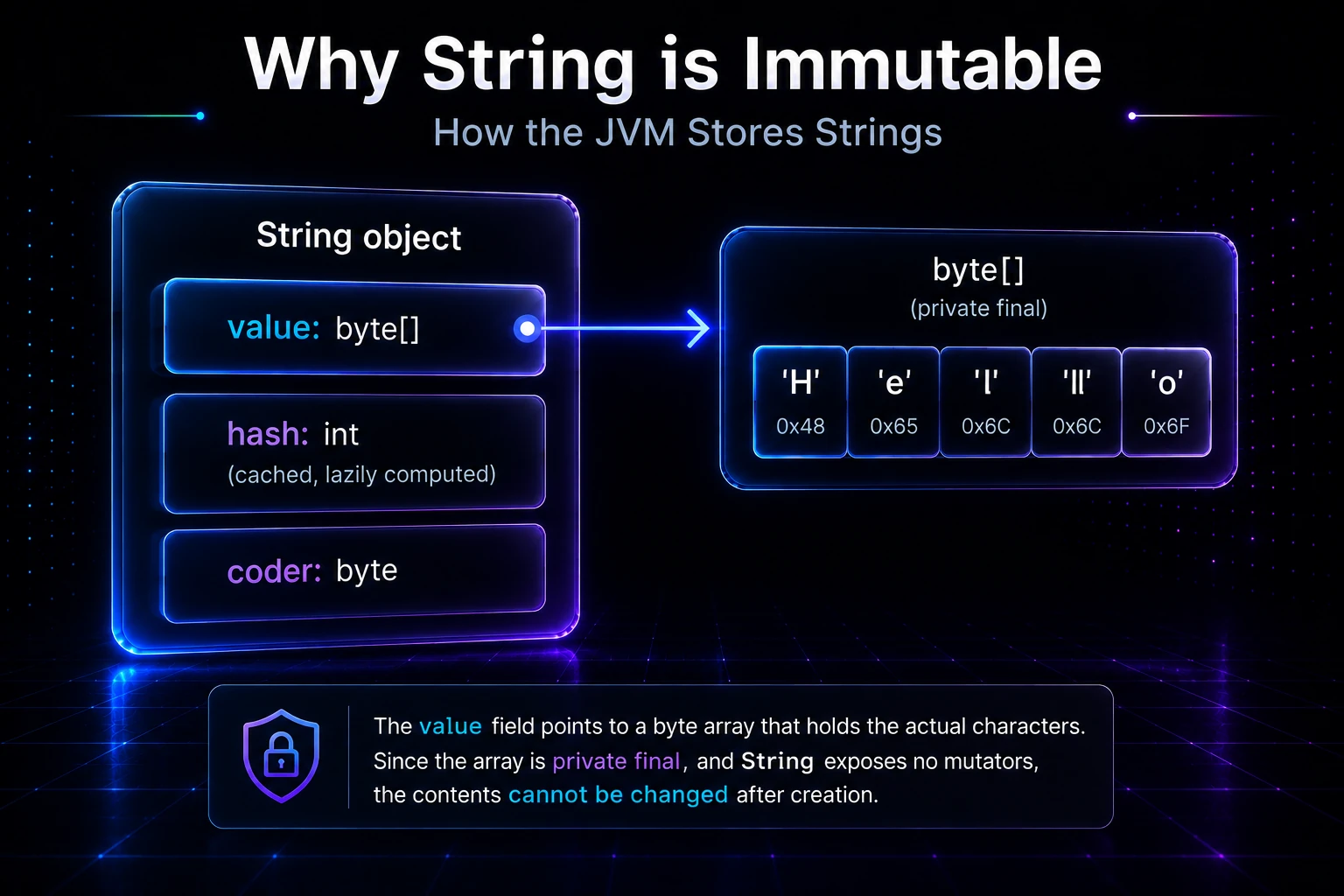
Internally, a String holds:
- A
byte[]array (since Java 9;char[]before Java 9) containing the encoded characters. - An
int hashfield (0 until firsthashCode()call). - A
byte coderflag (Java 9+) indicating whether Latin-1 or UTF-16 encoding is used.
The value array is declared private final, and String exposes no method that modifies it. There is no setCharAt or similar mutator.
+------------------+
|  String object   |
|  value: byte[]   |  ──► [ 'H','e','l','l','o' ]  (private final)
|  hash:  int      |      (cached, lazily computed)
|  coder: byte     |
+------------------+
Compact Strings (Java 9+)
Before Java 9, every character occupied 2 bytes (UTF-16). Java 9 introduced Compact Strings: if every character fits in Latin-1 (code point ≤ 255), the array uses 1 byte per character, cutting memory usage roughly in half for ASCII-heavy applications. This optimization is transparent and possible only because strings are immutable — the encoding cannot change after construction.
Reflection Can Break Immutability (Don’t Do It)
It is technically possible to mutate a String’s backing array via reflection, but this is undefined behavior, violates the Java specification, and can corrupt the string pool:
// WARNING: Never do this in real code — included only to illustrate the internals
import java.lang.reflect.Field;

String s = "Hello";
Field value = String.class.getDeclaredField("value");
value.setAccessible(true);
byte[] bytes = (byte[]) value.get(s);
bytes[0] = (byte) 'J'; // corrupts the pool entry!
System.out.println(s); // may print "Jello" — undefined and dangerous
Warning: Mutating a
Stringthrough reflection is undefined behavior. Because"Hello"may be interned in the String Pool, this mutation can silently corrupt every part of your program that holds a reference to the same interned string.
Practical Takeaways
| Scenario | Recommendation |
|---|---|
| Building a string in a loop | Use StringBuilder — it is mutable and fast |
| Thread-safe string building | Use StringBuffer — synchronized |
| Read-only shared constant | String is perfect |
HashMap key | String is ideal due to cached hashcode |
| Sensitive data (password) | Consider char[] — can be explicitly zeroed after use |
Tip: If you find yourself concatenating strings in a tight loop with
+, switch toStringBuilder. The compiler optimizes simple cases, but complex loops benefit from explicitStringBuilderuse. See String Concatenation for the full story.
A Quick Experiment
You can verify immutability yourself by comparing object identities:
public class IdentityCheck {
    public static void main(String[] args) {
        String original = "Java";
        String modified = original.toUpperCase(); // returns a NEW object

        System.out.println(original);                      // Java
        System.out.println(modified);                      // JAVA
        System.out.println(original == modified);          // false — different objects
        System.out.println(System.identityHashCode(original));
        System.out.println(System.identityHashCode(modified)); // different codes
    }
}
Output:
Java
JAVA
false
(two different integers)toUpperCase(), toLowerCase(), trim(), replace() — every String method that “transforms” the string returns a new object. The original is untouched.
Related Topics
- String Pool & intern() — how the JVM shares String objects in memory and how
intern()gives you manual control - StringBuilder — the mutable alternative to use when building strings dynamically
- StringBuffer — thread-safe mutable string building
- String Comparison — why you must use
.equals()instead of==for string comparison - String Concatenation — what really happens with
+and when to preferStringBuilder - Garbage Collection Deep-Dive — what happens to discarded String objects once they leave scope